Your salt water generator percentage setting controls chlorine production, not the chlorine concentration in the pool. Tune it from measured free chlorine trends and the hours the cell can actually operate. The same percentage can give very different results after a schedule change.
A setting that worked last month may need adjustment after hotter weather or heavier use. Start with a valid water test and a record of the current setup. Changing several settings together makes the result harder to interpret.
Read the percentage alongside eligible operating hours
The cell needs suitable operating conditions before a production command can achieve anything. Pump runtime is only part of that picture. A no flow warning, temperature restriction, or disabled chlorination period can reduce the available time.
As a planning comparison, multiply eligible hours by the output fraction. Eight hours at 50% gives four equivalent hours at full output. Eight hours at 60% gives 4.8 equivalent hours.
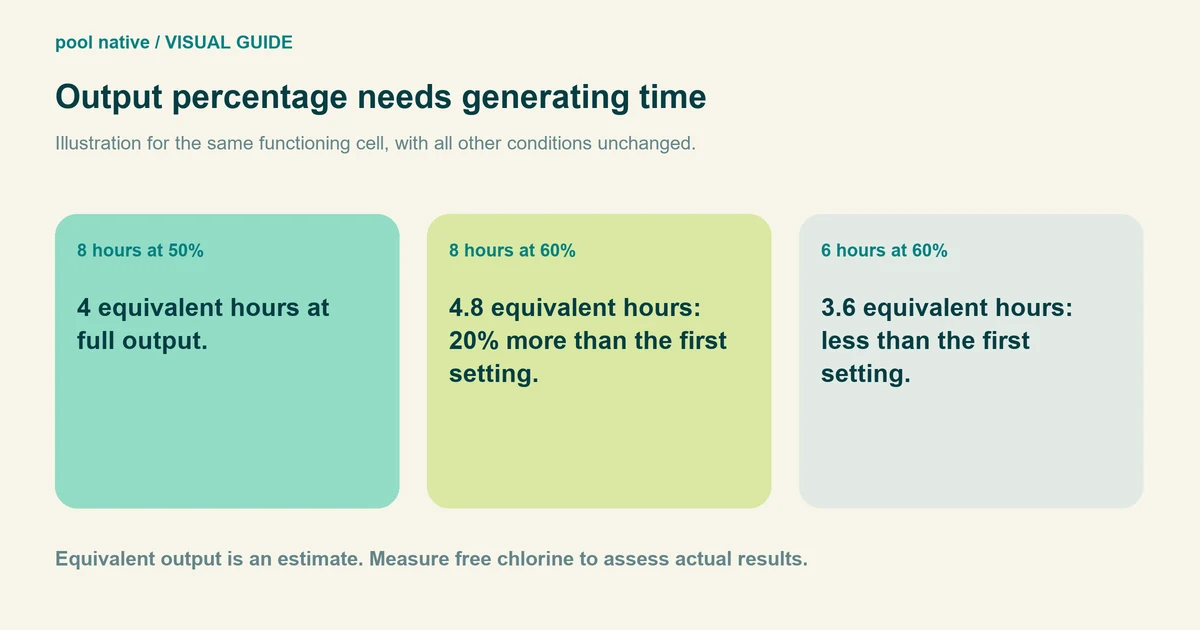
That change adds ten percentage points but increases the calculated production allowance by 20%. It does not mean the pool’s free chlorine will rise by 20%. Consumption, water conditions, and the controller’s operating cycle still affect the result.
| Hypothetical schedule | Equivalent full output hours | What changed |
|---|---|---|
| 8 eligible hours at 50% | 4 | Starting comparison. |
| 8 eligible hours at 60% | 4.8 | 20% more calculated production allowance. |
| 6 eligible hours at 60% | 3.6 | Less allowance than the starting schedule despite a higher percentage. |
These examples assume the cell can generate throughout the eligible window. They are not a chlorine dose or a prediction of the next test result. For equipment capacity rather than routine adjustment, compare chlorinator output and pool demand.
Find which controller owns the setting
Check whether you are adjusting the salt unit itself or a connected automation system. On the AquaRite 900, active remote control can disable the local output dial. Turning that dial then may not change the commanded production.
Use the model’s operating instructions and confirm that the displayed setting actually changed. The AquaRite S3 chlorination menu requires confirmation with OK. Do not transfer one panel’s button sequence to a different generation.
Also confirm the correct body of water when an installation serves a pool and spa. Write down the normal schedule before changing it. An unexplained schedule override is worth resolving before you tune around it.
Adjust output from a simple log
Test free chlorine with the same suitable method at a consistent time. Record pH and other results needed to interpret the treatment requirements. Confirm your target from applicable guidance and product instructions.
Record output percentage, eligible hours, and controller warnings. Note unusually heavy swimming, rain, water replacement, or strong temperature changes. These observations help explain a different result.
If normal operation is confirmed, change one control variable in a modest step. Keep the rest of the setup consistent enough to compare. Record the change before forgetting the original value.
Retest and assess the trend rather than one isolated reading. Test more closely while correcting an unstable situation. Do not wait through several low readings simply to complete an experiment.
If free chlorine is already inadequate, routine percentage tuning is not a substitute for prompt corrective treatment. Follow an appropriate treatment procedure and verify water conditions before swimming. A generator works over time; its boost button does not instantly restore the pool.
When a higher setting is the wrong next step
If the panel reports a fault, resolve that condition first. Increasing a command cannot make a disabled cell produce. Follow the chlorine generation troubleshooting route when the unit appears inactive.
If production appears normal but free chlorine keeps falling, review demand, stabilizer, test reliability, and actual runtime. A sustained 100% requirement can mean insufficient capacity, unusually high demand, or a problem elsewhere. The percentage alone does not identify which.
Return to the log after a pump schedule change, seasonal shift, or unusual pool use. Keep the final working setting with your routine salt pool care records. That gives you a useful starting point next season without treating last year’s number as permanent.


